Introducing automated data quality checks!
We’re excited to announce a major new feature on the Water Rangers data platform: automated data quality checks!

Automated data checks combined with human review strengthen trust in community-collected data.
Our new automated data quality check process flags potential issues as observations are submitted. Helping data collectors catch and correct mistakes early and giving dataset admins a faster, clearer way to review data. This approach strengthens trust in community science data used for research and decision-making. This work is supported by RBC Foundation.
The new feature uses a two-fold approach:
- Automated checks flag potential issues as data collectors submit observations.
- Dataset administrators review flagged data to ensure true observations aren’t treated as errors.
What this means for you
If you’re a data collector
- You’ll get immediate, actionable feedback on your observations.
- You’ll catch common mistakes before they are saved and misinform decisions.
- You’ll receive email notifications when a dataset admin leaves you a note.
What you need to do:
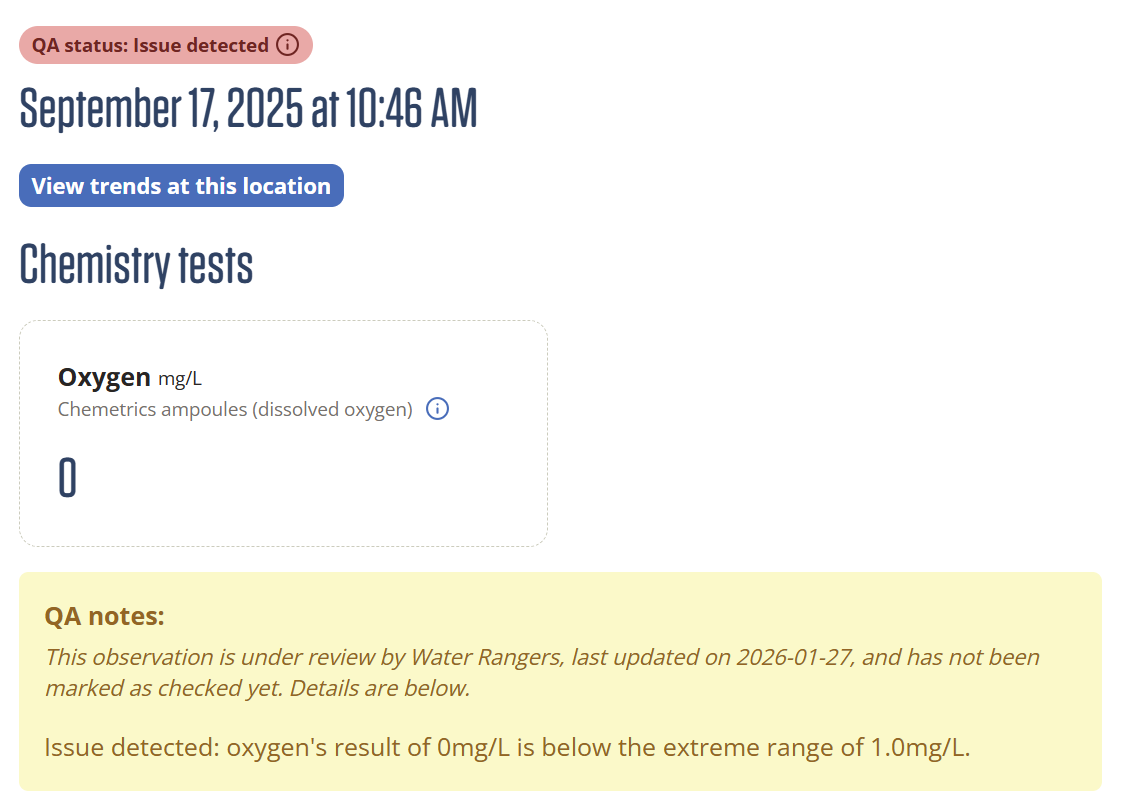
- Review data quality flags when they appear on your observations.
- Correct errors where needed, or add notes providing context if the result is correct.
Watch the QA process in action!
If you’re a dataset administrator
- You’ll be able to communicate clearly with collectors about their observations using built‑in notes.
- You’ll be able to filter and download observations by date, location and other fields.
- You can quickly review the data and distinguish the real issues from true but unusual results.
- You’ll have more confidence in the data you publish and share.
What you need to do:
- Review all flagged observations from your dashboard.
- Approve, edit, or mark observations for follow‑up.
- Set up a schedule to review the flagged observations regularly.

Watch an explanation of how to use the new Data check dashboard!
Why do data quality checks matter?
Common issues flagged
- Recording results in different units than expected °F instead of °C.
- Zeros used as placeholders when a measurement wasn’t taken.
- Typos and decimal issues (recording 5.82 vs 582 for conductivity).
- Readings significantly different from “normal” measurements.
High-quality data is the foundation of meaningful community science monitoring. However, even minor issues, such as typos or unit mix-ups, can reduce confidence in the data or limit how it can be used.
Organizations use quality assurance and quality control (QA/QC) checks to detect and correct errors and ensure reliable data use. Previously, Water Rangers staff manually reviewed the new data each week. That process was time‑consuming and still left room for errors. Automated checks add an earlier, more consistent layer of review.
Water Rangers is part of the CaSTCo partnership in the UK, a collective working to develop tools and best practices for community scientists collecting and sharing their data. Read more here.
How the automated QA process works
Built in equipment limits prevent impossible values
Each observation on our platform now includes information about the equipment used to measure results! Each monitoring method includes equipment limits that prevent users from entering values beyond what the device can measure.
For example the Taylor teststrips in our testkits have an upper limit of 8.4 for pH, any values above this limit cannot be entered for this equipment.
If you contribute data to a dataset on the Water Rangers platform, our automated QA works quietly in the background—no action required from you. The automated QA feature flags potential issues as soon as you enter an observation, and we’ve applied these same checks to all historical data on the platform.
Here’s what to expect:
- The platform clearly flags observations that may need review.
- The QA process adds notes explaining why it flagged a result.
- Dataset administrators have final review and approval of all observations
- When a dataset admin leaves a note on an observation, the platform will send you an email notification.
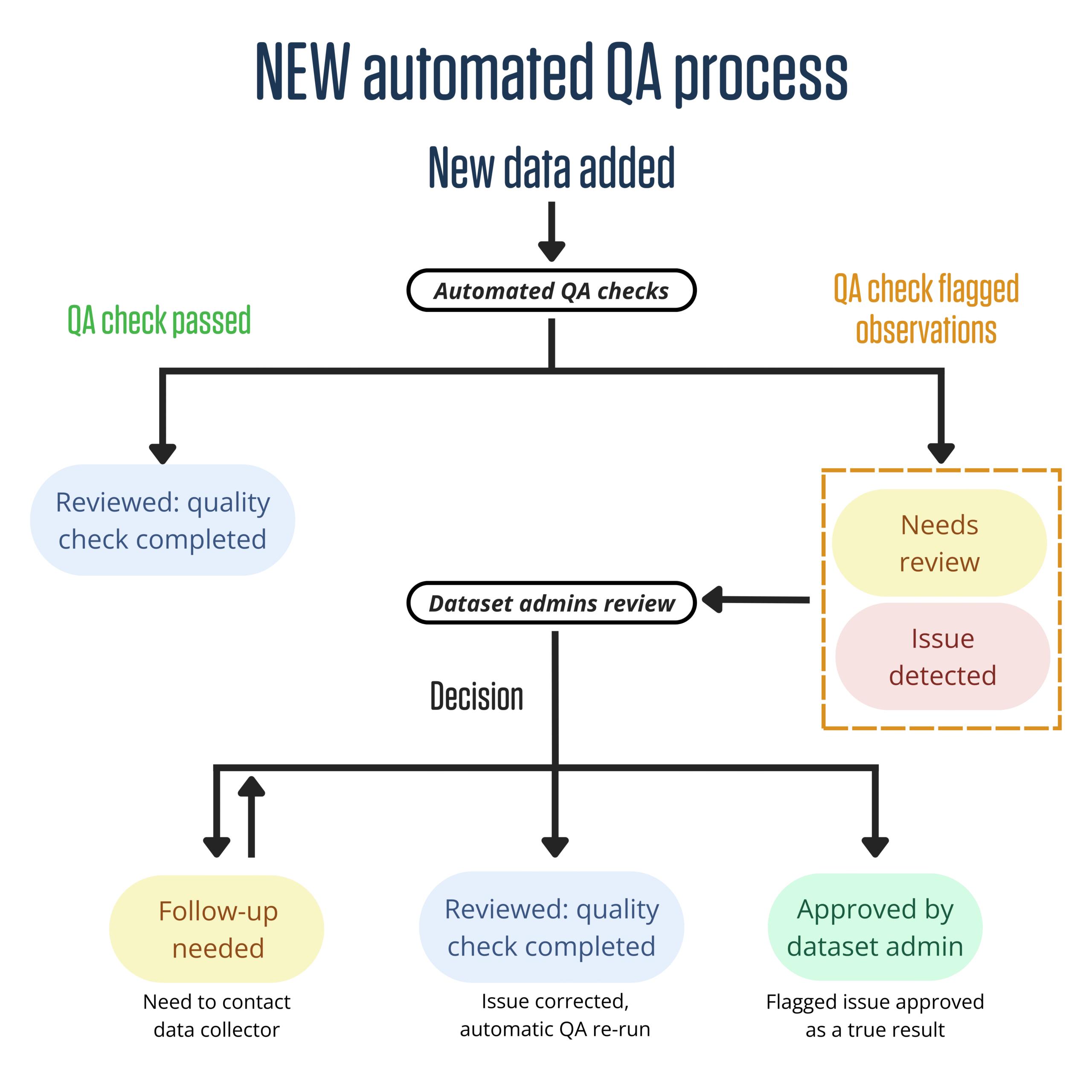
The flow diagram below provides an overview of the two-fold QA process applied to every new observation uploaded. While Water Rangers QA will flag observations, dataset administrators can also use these new QA statuses to flag observations that have issues.
Together, automated checks, review by dataset administrators, and equipment limits create multiple layers of quality review for data quality without adding extra steps for data collectors.
Understanding the new QA statuses
The platform assigns each observation a QA status to clearly communicate any actions needed.
| QA status | Explanation | Status assigned by |
| Not yet checked | This observation has not been reviewed for data quality. | Water Rangers QA, dataset administrators |
| Reviewed: quality check complete | Automated QA checks found no issues with this observation (note issues may still be present). | Water Rangers QA, dataset administrators |
| Needs review | One or more readings in the observation are unusual for the parameter or unlikely based on past observations at the site and need review. | Water Rangers QA, dataset administrators |
| Issue detected | One or more readings in the observation exceed plausible limits (i.e pH values below 2). | Water Rangers QA, dataset administrators |
| Follow-up needed | Investigation is ongoing. One or more issues need to be confirmed and/or corrected with the data collector. | Dataset administrators |
| Approved by dataset admin | The dataset admin completed a secondary review of the flagged observation and has confirmed it is correct. | Dataset administrators |
A note on QA flags
Our new automated QA is designed to catch common issues, but it isn’t perfect. A flagged observation does not mean the data is incorrect it simply suggests where further review may be needed.
Automated QA may still flag some true and important results, especially if they fall outside typical site conditions. Likewise, not every possible issue can be detected automatically. We’ll continue to refine the QA rules based on feedback from the community.
Reach out to us at data@waterrangers.ca to share your feedback.
What dataset administrators can do
For dataset admins, automated QA provides a structured, efficient way to review data without manually checking every observation.
Finding flagged data
- Dashboard notifications alert you to flagged observations needing review.
- Access the Data Check (QA) page directly from the dataset edit view.
Reviewing and resolving flags
From the QA page, admins can:
- Review the flagged observations.
- Approve results that are correct.
- Mark observations as needing follow-up.
- Edit observations and leave admin notes for data collectors.
Filtering and downloading your data
This brings back a much-missed feature from the previous platform! Admins can also use the new QA tools to:
- Filter data by QA status.
- Narrow results by date range or location.
- Download only the subset of data they need.
What’s next
We encourage everyone to try out the new QA tools:
- Review flagged observations in your datasets.
- Share your feedback with us!
- Use admin notes to communicate clearly and efficiently.
- For admins, try filtering and downloading a subset of your dataset.
With automated QA, Water Rangers takes a big step toward more reliable data, smoother workflows, and better support for everyone contributing to freshwater monitoring.
With gratitude to RBC Foundation
Water Rangers is proud to acknowledge support from RBC Foundation for our project Growing Data to Action: Empowering Communities with Open, Actionable Water Insights. RBC Foundation’s two-year, $200,000 donation is helping support our work to enhance the Water Rangers platform with new tools that help make water data more accessible, inclusive, and actionable.